•Accessible via MAIN MENU > TOOLS tab.
•The Content Cleanup menu provides many options for dealing with obsolete content inside a project and help users in cleaning up disk space.
•Each option will prompt a popup to confirm your choice.
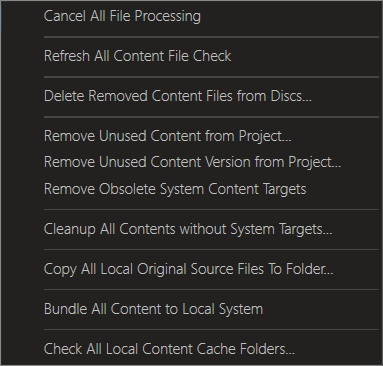
Cancel All File Processing |
Stops all transcoding and proxy creation. |
Refresh All Content File Check |
Checks source files for changes. |
Delete Removed Content Files from Disks |
Cleans all removed content from project data folders - original source files remain untouched. |
Removed Unused Content from Project |
Remove all content not assigned to Clip Containers or not used in other places in project. |
Remove Unused Content Version from Project |
Remove versions of active content that are no longer in use. |
Remove Obsolete System Content Targets |
Removes content where the target system is no longer part of the full vertex system. Does not delete the local content on the systems hard drives. |
Cleanup All Contents without System Targets |
Remove all content without a system target. |
Remove Obsolete System Content Targets |
Removes Content Target Systems that is no longer part of the Vertex session. |
Copy All Local Original Source Files |
Opens a dialog box to select a folder and copy all the original files into. |
Bundle all Content to Local System |
This will open a new dialog box with the following options for cleaning the project for an archival bundle: •Delete unused Clips from the project •Delete unused Contents from the project •Delete unused Content Versions from the project •Cleanup your Systems project folders |
Check All Local Content Cache folders... |
Detects if folders are missing or corrupted from the local content folder. |